Not all drone inspection software is built for utilities. Generic platforms were designed for construction sites, roof surveys, or agricultural mapping. When a utility operations team tries to force those tools into a distribution inspection workflow, the gaps show up fast: manual photo sorting that takes days, no integration with GIS or work order systems, and no way to get crews moving without a week of back-office processing.
If your utility is building or expanding an in-house drone program, the software you choose will determine whether that program pays for itself or becomes a burden. Here is what actually matters.
1. Automatic Photo Organization by Asset and GPS
After a day of flying, a pilot may return with thousands of images. Without the right software, organizing those photos by structure and location can take days. That lag eliminates one of the biggest advantages of drone-based inspections: speed.
Look for a platform that reads GPS metadata from each image and automatically sorts photos to the correct asset. What should take days manually should take minutes with the right software. Utileyes Inspections was built with this step as a core function: photos upload and organize automatically, so pilots can focus on flying and inspectors can get to work the same day.
2. Workflow Built for the Full Inspection Cycle
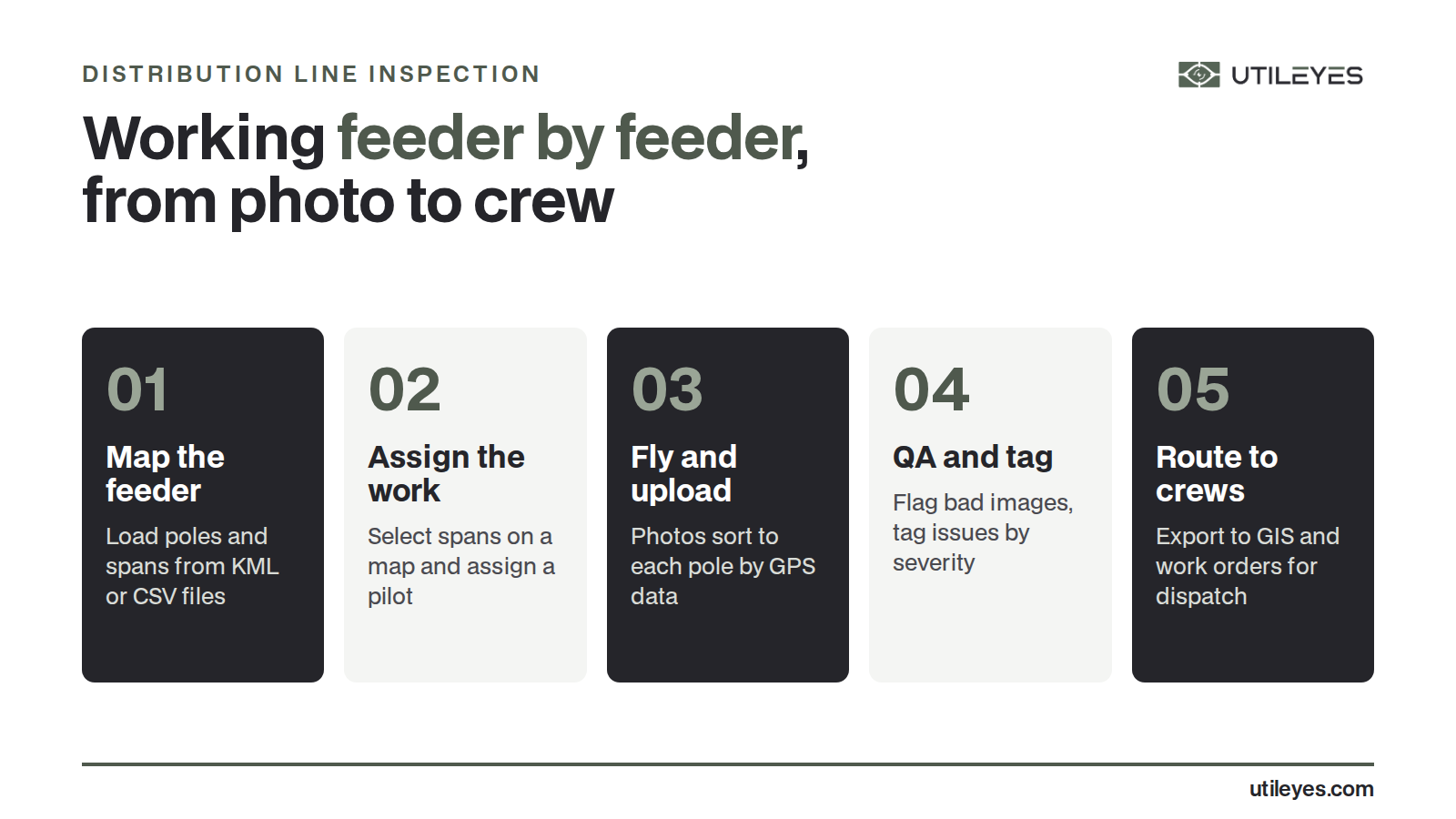
Software that only handles image storage is not inspection software. For a utility, the workflow runs from pre-flight mapping through pilot assignment, image QA, anomaly tagging, report generation, and crew dispatch. A platform that handles only part of that process creates handoff friction at every gap.
What to look for in a complete workflow:
- Upload or auto-generate mapping files (KML/CSV)
- Assign and delegate pilots visually using a map interface
- Flag mismatched or incomplete images during QA
- Customizable inspection forms with severity tagging
- Report export to CSV or direct sync with work order systems
The faster the platform can move data from photo captured to lineman dispatched, the more value the program delivers. This is where purpose-built platforms like Utileyes have a meaningful edge over generic drone tools.
3. Thermal and RGB Support
Distribution inspections require two types of imagery depending on the objective. RGB (standard visual) images document structural condition: crossarms, hardware, insulators, conductor condition. Thermal imagery reveals what RGB cannot: overloaded connections, failing components, and hotspots that precede equipment failure or fire ignition.
Your software needs to support both. That means the ability to view thermal and visual images side-by-side, apply severity rankings to thermal anomalies, and export findings in formats that maintenance and compliance teams can act on.
In fire-prone regions especially, thermal inspection is not optional. It is a core part of a credible wildfire risk management program.
4. Integration with GIS and Work Order Platforms
Inspection data that lives only inside the drone software is only half useful. For utilities, the value comes when findings connect directly to systems like ArcGIS/ESRI, enterprise asset management (EAM) platforms, or work order systems. Effective integration means ensuring drone data formats align with existing maintenance, GIS, and enterprise asset management systems, and connecting anomaly detection directly to work order generation and asset tracking.
Before selecting a platform, confirm it can export in formats your operations team actually uses, and ask specifically about integration with the GIS and work order tools already in your stack.
5. Simplicity and Usability for Field Teams
Overly complex software gets abandoned. Platforms loaded with features that require weeks of training slow adoption and push utilities back toward outsourcing.
The best utility drone inspection software is lean. Field teams should be able to learn the core workflow quickly. Inspectors should be able to tag anomalies, assign severity, and generate reports without needing an IT department. The more intuitive the platform, the more consistently it gets used, and consistent use is what generates the data that makes a program valuable over time.
Utileyes was built on direct feedback from utilities who were frustrated with overengineered platforms that created more work than they eliminated. Simplicity was a design requirement, not an afterthought.

6. Speed from Flight to Dispatch
This is the metric that separates utility-grade software from everything else. In a storm response, a red-flag fire day, or a post-event assessment, every hour between photo capture and crew deployment has real consequences for reliability and public safety.
The standard to evaluate against: how long does it take to go from photos uploaded to a lineman dispatched with a work order? With Utileyes, that window can be under 15 minutes. With some competing platforms, the same process can stretch to days or weeks, depending on how much manual work is required to organize images and prepare them for inspection.
That gap matters at the operational level. It matters even more when wildfire risk is on the line.
7. Scalability for an Internal Program
If you are building an in-house drone program, you need software that grows with you. That means it should handle a single feeder pilot program just as cleanly as it handles a regional rollout across thousands of miles of line.
Look for a platform that supports multiple pilots, multiple circuits, and tiered user roles so operations managers, pilots, and inspectors each see what they need without getting in each other's way. Cloud-based platforms with role-based access make this significantly easier to manage as teams scale.
Final Thoughts
The right drone inspection software does not just store images. It eliminates manual steps, accelerates the time from flight to action, integrates with the systems your utility already relies on, and stays simple enough that your team will actually use it every day.
Generic platforms can capture data. Purpose-built platforms like Utileyes Inspections turn that data into dispatched crews, reduced costs, and better grid reliability.
Frequently Asked Questions
Can we use any drone with utility inspection software? Most platforms support any drone that embeds GPS metadata into image files, which is standard on modern commercial drones like DJI Matrice and Mavic series. Before purchasing hardware, confirm your software can ingest the metadata format your drone produces.
Do we need GIS data before we can start? Not necessarily. Some platforms, including Utileyes, can auto-generate mapping files from flight data. Full GIS integration is valuable for mature programs but is not required to launch a pilot program.
How long does it take to get a team up and running on new software? This depends on the platform. Purpose-built utility platforms with intuitive interfaces can have a small team operational within 30 days. More complex enterprise platforms often require longer onboarding and dedicated IT involvement.
Is thermal data handled differently than RGB in inspection software? Yes. Thermal imagery requires software that can read radiometric data, apply temperature thresholds, and allow inspectors to flag heat anomalies by severity. Not all platforms support this natively, so confirm thermal capability if it is part of your inspection program.
What should we export from the software when inspections are complete? At minimum, look for CSV export for anomaly data and work order generation, plus image packages with GPS coordinates. Platforms that sync directly with ArcGIS/ESRI or your EAM system reduce the manual steps between inspection finding and crew dispatch.